
Welcome to Elderfield includes character creation and appearance customization. You are not limited to the original fixed protagonist appearance. The Wardrobe also lets you change your appearance later, so the initial look does not have to be your only look for the entire save.
The character creator has changed during development. An older video or discussion can show fewer choices than your installed game, so use the options visible in your own menu when comparing looks.
Preview your character in the creator
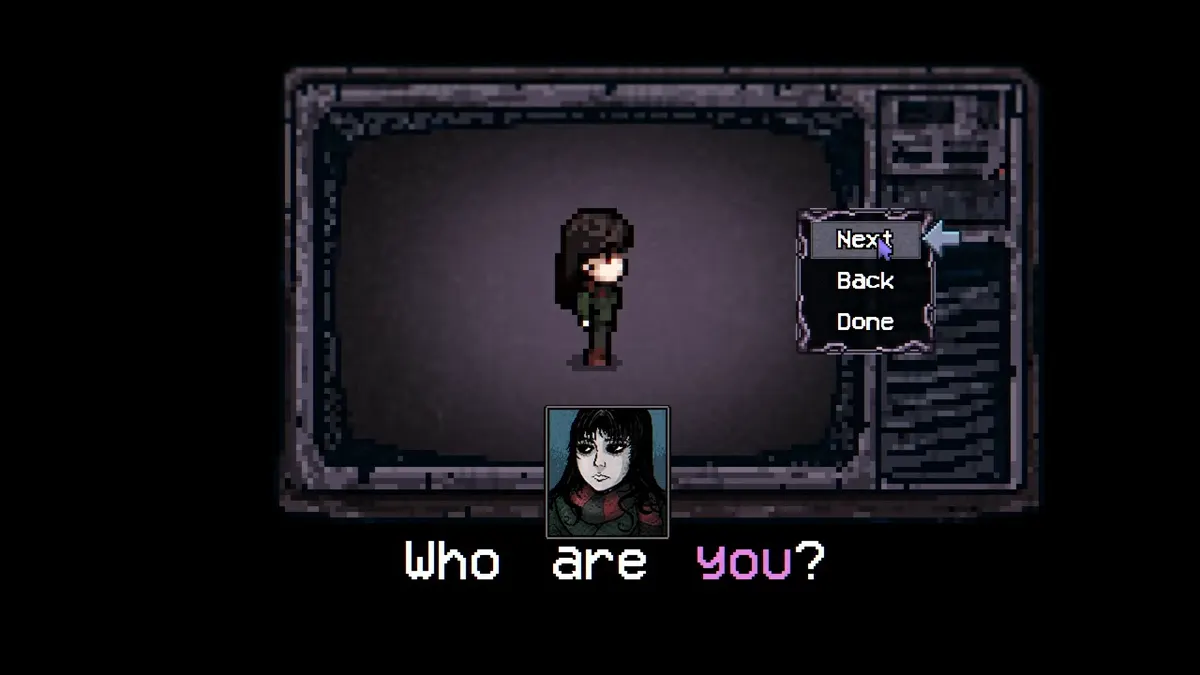
Begin with the Face/Body selection and inspect the portrait alongside the character preview. A later update changed this screen to show the current portrait, making the preview useful while choosing your appearance.
On the “Who are you?” screen, the character sprite appears in the center and the portrait sits below it. The controls on the right are Next, Back, and Done.
- Compare the central sprite with the portrait below it.
- Use Next and Back to compare the available previews.
- Choose Done when you have selected the look you want.
Work through the appearance choices offered by your build and compare them before confirming. Hair styles are part of the customization system, but an old demonstration is not a reliable count of every style in the current game.
For a clear comparison, return to a look you liked before trying the next option. That helps you choose based on the actual preview rather than remember one frame from a different version's menu.
Character creation concerns your player character. The character directory covers the residents you meet around town, which is a separate subject from the appearance menu.
Change appearance later with the Wardrobe
The Wardrobe provides a way to revise your character's appearance after the initial creation step. If you have access to it, use its appearance controls rather than assume you need to start a new save simply to change how your character looks.
This is a visual customization feature. Do not assume the Wardrobe also changes every other decision you made when starting the game. Check the options it actually displays; changing appearance does not establish that it can reset your name, difficulty, or other save choices.
The initial creator and the Wardrobe serve different moments: one sets up your starting look, while the other lets you revisit appearance later. You can choose a look you like now without treating it as permanently locked.
Understand differences between older and newer menus
Character customization was added after an early development period when it was not planned. A January 2025 answer saying there were no plans for it was followed by an April 2025 confirmation that the system had been added. Treat the earlier answer as outdated when deciding whether customization exists.
The available hair styles also expanded. A May 2025 update added bun and fringe options, and Demo v0.11.17 added five more hairstyles in September 2026. Those additions describe changes at particular points in development; they do not establish the total number of styles in every installed version.
If a tutorial seems to show a different set of choices, compare the version first. The discrepancy does not automatically mean you have missed an unlock or installed the game incorrectly.
Check the starting sequence if customization is missing
A September 2026 demo hotfix corrected a starting-sequence problem that could place the player in the wrong area without showing character customization. This was a specific historical fix, rather than a rule that the current full game should skip its creator.
If your starting sequence behaves unexpectedly, record the game version and whether you are using an old demo build or the full game before comparing it with a tutorial. An old demonstration can describe a different opening flow.
For the broader early-game routine after choosing your appearance, use the beginner tips guide. Once you are meeting residents, the romance guide covers relationships separately from designing your player character.
Editorial verification
This guide was source-checked on . Confirmed game details, community observations, older-build behavior, and unresolved evidence gaps are identified in the article instead of being presented as equally certain.
Found an outdated step or a version mismatch? Send a correction to Kevin.